Recorded live
30 minutes
Free to watch · No registration
Watch the recordingCore Topics in CBT
Patrick McGhee works through a full caseload in Flutura, from assigning a thought record to the notes a recorded session produces.
Recorded live
30 minutes
Free to watch · No registration
Watch the recording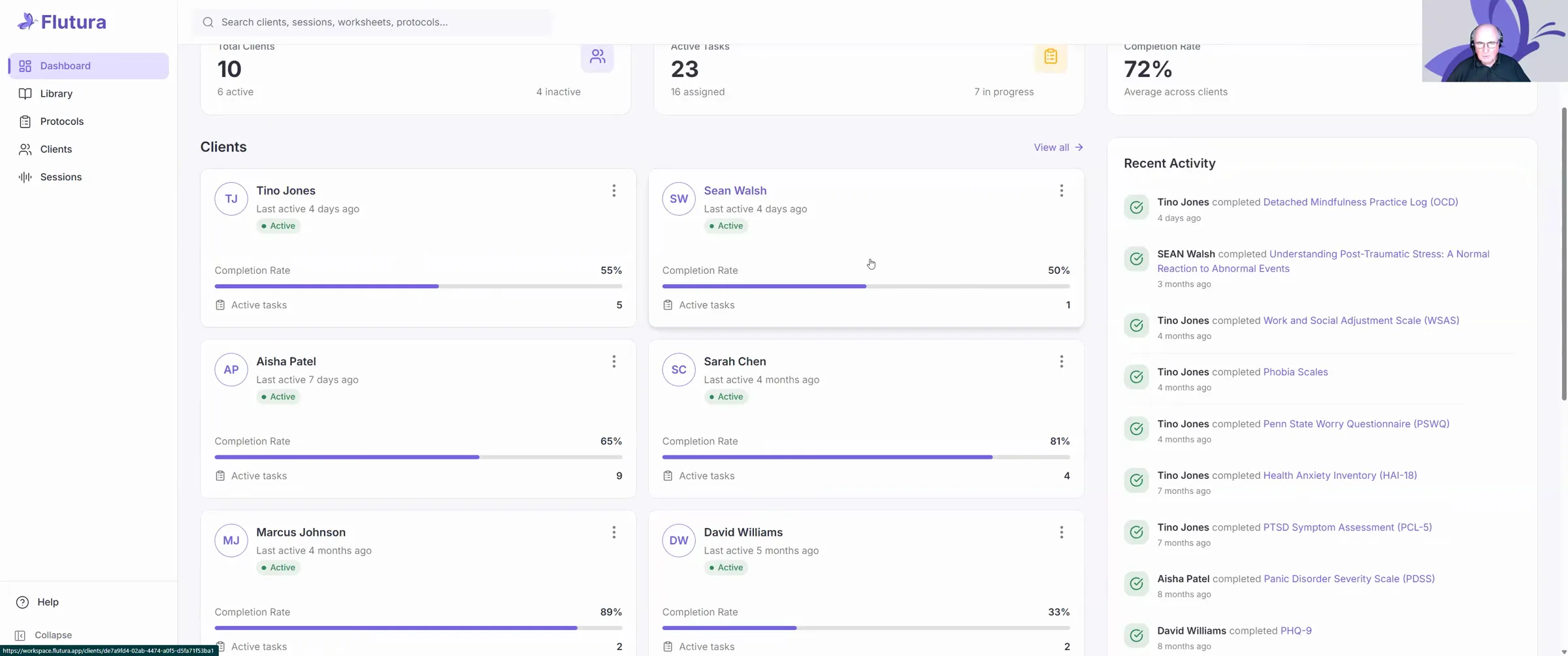
Patrick McGhee walks through Flutura, using the thought, feeling and behaviour sequence as the thread. It is a working demonstration rather than a taught session, run in a demo account, so every client named on screen is fictional.
He opens on the dashboard, which gathers caseload size, outstanding tasks and completion rates in one view, then moves into the library. Resources are filtered by presenting condition, and he opens the Cognitive Behavioural Map to show how one is put together: its purpose, the therapist instructions, when to use it, and the client-facing fields for the situation, the thoughts that followed, the feelings and their intensity, what the body did, and what the client did next.
Assigning is the part he returns to most often. A worksheet goes to a named client with an optional date and a short note, and the same worksheet can go to several clients at once, which he frames around couples and family work.
Protocols come next. The health anxiety pathway sets its six stages down one column with the resources for each stage running along the row, so the sequence and the materials for it sit together.
On the client side he shows PHQ-9 and GAD-7 scores plotted across several weeks, daily mood logging with optional reminders, and a risk indicator that surfaces as soon as a client profile opens.
The longest stretch is session recording. He records a short exchange live, working through the evidence for and against a client’s reading of his manager’s emails, and the system returns both a transcript and clinical notes grouped under agenda, in-session activities, risk, homework and next steps. He then edits one of those notes on screen, to show that the written record stays the therapist’s.
He closes on price: £29 a month with no caps on clients, recordings or exercises, and a £1 trial for 30 days.
So thought, behaviour, action. Through Flutura. Flutura is an app. designed by therapists for therapists, and is very focused on making sure that administration is cut down so that you can concentrate on your clinical skills. As you can see, I'm going to log into the main Section now, but it works on iPhones, Android phones, Google, tablets and PCs and laptops. Generally speaking, therapists log on via laptops or.
Desktops. Whereas clients log on with their phone, and that is built into the design. So I'm going to take you into the demo section here, which looks and feels exactly like the real thing, it's just we've created it as an account with dummy clients. So none of the names that you see actually represent real clients, of course. So you simply go to Flutura.app. This is set up, I just click in to log in.
And the opening dashboard does look a little bit busy initially. These things always do, but don't let that put you off because what it's doing is like a dashboard on a car, one of these modern cars where it shows you everything you need to know as soon as you turn on the engine. Let's just take it step by step. There are 5 sections to Dashboard, which is where we are.
The library of resources, which we'll look at. Protocols, which is particular organizations of the library of resources in, evidence-based sequence. Our information about clients and how we can connect with them, and then the recording of the sessions.
But on this, we've got a dashboard. So, total number of clients, 10, 6 are active, 4 are inactive. The number of tasks, like when we're asking a client to fill in a questionnaire, there's 23 that we have had.
16 has happened and seven are still in progress. Completion rate always very important if you're working in charities or in private practice. Completion rate here of the tasks is 72% across all clients, which is pretty good.
We've got the names of individual clients here, they've all got a little box to themselves. You can see the individual completion rate of the task, so you can see which ones are really getting into the homework, and which ones are not. And we'll come back to these clients later, when we link into our
allocation system. On the right-hand side, a little diary tells you what you've been doing. Tino Jones, and what your clients have been doing. Tino Jones completed detached mindfulness practice
Well done, Tino. Sean Walsh completed understanding post-traumatic stress. So you can track what your clients have been doing, and you can set it up so it gives you a little notification when you get to different points, but you don't have to do that. Bob.
You've also got the main instructions about assigning tasks, recording sessions, or adding a new client. We won't do any of those just now. We'll come back to those. Let's look at the library. And again, there's a lot in here, but it's very, very well organized. First of all, we can search for anything in here. And then it's organized by worksheets, which are little…
exercises clients can do, or it might just be psychoeducation leaflets. Then we've got particular assessments, which are all well-known, standard, validated, and reliable scales. And we've got individual resources, which just helps the client learn about individual ideas and socialization into treatments, psychoeducation, and so on. So, let's go and think about
We have a client maybe who is coming to psychotherapy and we're trying to get them to recognise the importance of thoughts in mediating the link between their perception of the world around them and their emotional reaction.
So let's go to low self-esteem. You'll see it's all organized under different psychological conditions, and several of the exercises linked to more than one condition, of course, so it does appear more than once. So just click on low self-esteem, and immediately, it's very, very fast, we get up to these. So let's go to Cognitive-Behavioural Map. Here, which is, kind of Padesky-type…
Hot cross bun. And you can see now that we've got, the name of the exercise we're in, the purpose. In case you forget. Helps identify links between a situation, your thoughts, feelings, physical sensations, and behaviours to break unhelpful cycles. The instructions to therapists are here.
When to use it, client instructions. So it's not just a, you know, like a big massive PDF that you just have to work out for yourself. It's very targeted. Very interactive, very customized. So relative background information, the client would decide you can assign this to a client and they will start to fill it in. But just for now to look at the components.
You're asking the client about anything important was going on in their life at the time, maybe new job, moving house, exams, etc. What was the situation? What was happening when your mood changed? My boss sent me an ambiguous email. My friend didn't reply to my message.
someone looked at me the wrong way on the… on the bus. Your thoughts, what went through your mind? They're going to hit me, I'm a loser, I'm going to get sacked, they must be upset with me, you know, this sort of thing. Your feelings at the time, and you see here now, you know, a bit of interactivity, a bit of…
variation. The client can click on one of the faces to represent their emotion. How strongly did you feel it? You can move this to the right or left to indicate different levels of intensity. What did you notice in your body? Tight chest, sweating?
butterflies, etc. Your behaviour, what did you do? I got off the bus, I, threw… in the afternoon, I went home ill, and I, was very upset my friend wasn't going to talk to me. So you know this sort of thing. But how do you get from that really nice resource to giving it to a client? Well, it's the big purple button over here.
I should say you can just download it if you wanted to and go old school, just download and print it out. But that would be a curious thing to do. Not just assigned to a client. Dead easy. And here's a list of all my clients. And I happen to be working right now with. David Williams, so I click on David. And I assign it to David. That's the Cognitive Behavioural Map.
Click on that, it comes up. And this will assign it to David. Fine, let's assign it. And so, we can select a date, so we can say to David, you know, let's do that before our next session, so let me just put it in here for the 16th. That's optional. And then just type in David. Here is the exercise. We discussed. Or whatever.
You can leave that blank, but, you know, put another thing, just confirm it. There we go, it's now been assigned. Look, you see at the top? Your client will receive a notification with a new assignment shortly. So they will know, and they will be able to just go straight in, once they've logged on, that they now have a little exercise to do, and that when they do it, you can see they've done it. If they don't.
do it by the deadline that they'll get a little reminder, and so on. So you can toggle with those sorts of things. But here's a little thing, I've used this a couple of times now, sometimes I'm doing Couples therapy. Maybe I want to give this exercise to David, and to his partner Sarah, so I can give it to both.
Right? It looks like to Davey Bones and Sarah Chen, I can go through it again. So, it might be the case that Your… clients… seasonal affective disorder, for example, and you want to give an exercise to all your clients to deal with seasonal affective disorder. It might be the case that, it's New Year's resolution time, and you want to give your clients some, you know, support around goals and projects.
Or, as I say, it might be a family therapy, it might be, children and young people, brothers and sisters. If you're doing relationship or family work, it's perfect. You can assign the same thing to do different clients. You can assign different things to do different clients at the same time, which is one of its, amazing strengths.
I can just simply go back now to the worksheets, and I've given it now to my client, David, and now he's done that, and I'm thinking, okay, it's time to do a little bit more work then. Let's go and have a look at… How he can be supported. In terms of… His thought record?
So click on that. This might be the, you know, the following session. Again, I won't go through all these. This is about trying to get the client to consider his thoughts and his feelings and unhelpful thinking styles. Again, you ask him about the situation, what was the automatic thought? Someone's ignoring me, what were the emotions? And now, this version of it, you can,
say, maybe sadness, and rate the intensity, but maybe you also felt angry. So you can add another item, and I won't do it now, but it'll come up again. You can add on another one. So it doesn't push the client into that kind of narrow thinking about one emotion. It's very flexible. It's customizable, because the client doesn't need to put in more than one emotion.
But, you know, we know the comorbidity of anxiety and depression. It means it's very, very good in the context of giving clients A chance to express all of their emotions. And then, unhelpful thinking styles. Identify any unhelpful thinking styles that fix your thought. All or nothing thinking, negative.
Filtering, blaming, personalizing, shoulds and musts, and so on. And then it'll allow you to discount… to add on other thinking styles there. Again, you assign that to the client, go back to David, give it to him, assign, and it goes on again. So that is how we can do that with David. But more generally, we can…
Think about treatment protocols. Now, it might be the case of working with a client who has got health anxiety. So we click on health anxiety, and what we get is not just A list of exercises, but a general introduction to ideas around. The core ideas around health anxiety, all supported by the evidence, suggestions for a format, 12 to 16 weekly sessions.
something brief 6 or 7 formats can be, tackled. And then it gives you a treatment pathway. It's not trying to be restrictive. It's not saying you've got to do this number of weeks. It's not saying you've got to do it in such a way that the client has X numbers of hours on that, and Y numbers of hours on this. That's not the way it works. But it does show you the full, Six part… Step. Model.
of the key Health anxiety. protocols. And in step one, we've got assessment and the autocratic formulation, so it's going to give you the health anxiety case formulation. Click on that, gives you the worksheet, will come up, and you can assign that to a client. Straight away, if you want to just check the content, click on that.
When you've done that, then you might want to have the client fill in the questionnaire, so you click on the brief between session measures, click on that, that will come up. So weekly tracker, you can click here to see the full content. Again, that'll go… that'll go back, but then we go back into health anxiety very easily, and we can see what we are allocating. And that goes on then, step by step. You see the…
The first column is the list of the sequences and health anxiety protocol. And then running along the row are the resources you need to execute that particular state. Of that particular protocol. So the protocols are very clever, organized, structured, Systems informed by official protocols.
Recognised by NHS and HSC, and elsewhere. And allowing you to keep track of where the client is up to, and where the therapy is up to, in terms of the work you're doing with them. When it comes onto… Clients? We can do some work by examining how clients are getting on, so I can look at,
Sean Walsh, last active 4 days ago. He seems to be completing about 50% of his tasks here. I can click there. And his full pattern comes up, and keep track of…
the number of tasks you've done in the last 6 days, the completion rate overall, any mood entries, again, not a time to show you that, but each day, you can allocate it so that Sean gets a little prompt to do a smiley or a sad face, etc, and it comes up in the diary system.
If he's doing it every day, he gets a little momentum point, bit of gamification. We can track PHQ-9 and GAD-7, I'll show you just how that works in a moment. And we can see the tasks that have been allocated to him. We've also got a record of his sessions, so we know, very easily which sessions he's had with you face-to-face or by Zoom. Alright.
We can go back in time and see what his mood was at various previous junctures. So, we can turn these things on or off, enable mood tracking, that's the client's daily log of their moods. You can send push reminders if you want, mobile phone notification to log his mood, and email reminders if you want. But you can turn these on and off very easily. Indeed, depending upon your
Approach, and depending on the client's preferences in there. Okay, so let's, have a look at some of the other functionality built into the client's base here. So you've got a client, maybe, who's got anxiety, they have
A range of unhelpful thinking styles, which means they're interpreting ambiguous or even quite clear communications in a black and white way, so they're always seeing the negative side of things, they're catastrophizing. And you can give them the exercises to look at that and track and see how they can tackle it. Let's look at Sarah Chen.
And here we have an interesting one, because Sarah has been allocated the PHQ-9 and the GAD-7 over several weeks. You can see how her scores have come down, because every time Sarah completes the weekly PHQ-9 questionnaire, the system records it and adds it onto her profile, and creates this wonderful graph. So you can see the…
improvement in her mood, the reduction in symptoms for both PHQ9, which measures depression, of course, and the GAD7, which measures anxiety. I always find this a very useful measure with clients, because if you show them this graph. They realize just how far they've come, and it can be very invigorating and re-motivating if they're kind of losing their way a little bit.
Again, we've got the full history of Sarah, and what she's been doing. Now, you might notice that on some of these, it's specified as just being a session. In others, it's specified as being a recording. And As we know, it's very important that We are able to keep track of clients' Perceptions over time of their situation, and also their insight into how their mood is improving, or not, as the case may be.
Very important that we've got a risk indicator front and center. As soon as I switch to Sarah Chen's profile, it comes up and tells me the risk level, and that's derived principally from PHQ-9, And other information that might be available in terms, say, of her daily log of mood. If it's been showing very depressed for several days, then it'll start to flag up. More of a risk here. Now…
One of the things I want to show you is the recording the session. Now this works very easily. It's one of the most popular features in the system, and as you can see, it's right up there on it, so it's very easy to get started. So you would turn… you would log in on your phone, your laptop, your desktop, whatever it might be, doing it on Zoom.
Teams, Google Video, or, if you're in the room face-to-face, it'll work, no matter what. So you just click on Record Session. And then you've got the choice between an audio recording and taking manual notes. This means it'll just give you a chance to type in, what you want to do. For the client, in terms of…
the notes that you've taken in the session itself, or maybe even afterwards, but it's good practice to write something down during the session. But what I want to show you is the audio recording. Now, this is going to be… it uses the speaker from your laptop, your phone. your desktop, any, it doesn't matter, or if you've got one added on, like I'm doing, it doesn't matter. It works every which way.
And you can simply have the recording made, and it will be, Audio file of the session, or part of the session if you turn it off halfway through, etc, plus a transcript.
But you can also turn on the AI-generated clinical notes, which organizes, right, it organizes the conversation into nice little sections, because we all know from with clients, they might do a bit of cognitive restructuring, then they want to talk more about, There. anger management issues, and then they come back to the cognitive restructuring. And it's quite helpful if you want to try and keep those themes
clear for yourself, and for your supervisor, and for your client, if you're, you know, making sure that you're following things up subsequently. And so, very simply, the AI will generate clinical notes that are thematically organised. I won't go into how it does it exactly, but it's very
Very highly encrypted. It meets all the standards for USA, EU, Britain and Ireland. It's just built in. There's not a problem about it. Nothing gets shared anywhere.
But it shouldn't be. So I'm going to start the session. What I'm going to do is I'm going to try and record a session live, so you can see it. I don't have anyone with me, but I'm going to pretend that I'm hearing them talk to me, but you'll get the gist of it. So I'll do it in connection with our thought and behaviour situation.
So, John, tell me more about the way in which You respond when you get an email from your boss. I see. So you… Feel that his emails are constantly trying to undermine you and setting you up to be sacked. Is that right? And… How do you feel when you.
Receive one of these emails. Okay, so you feel anxious? And what exactly are the thoughts that you have when you read the email? Okay, I can understand that. So what you're saying to me, just to check, you're saying that when you get an email from your boss. In your head, you've got a clear sense of He's either building up to fire you, or he's building up to give you the job of the other guy.
who might get fired, and you might get promoted to fill his shoes, is that correct? Okay. And you're also saying to me that, generally, it's that you feel you're going to get fired, and you have a sense that he is out to get you, yeah? Okay. So what evidence do you have that that thought is correct? That he is out to get you?
He, he's, he sends you lots of emails, ok and what evidence might you have that it's not correct? Okay. So he's sending you on a training course. All right. And he's encouraged you and your. project partner to to apply for promotion next year. Okay. I'm just wondering, is there any thought in your head now that those two things might be…
Connected the emotion that you feel and the beliefs that you have about your boss's emails, yeah? And you give me evidence for and against that, and that's really good, that's insightful. Is there a more balanced kind of thought you could… have that might be more useful and more accurate. Yeah, that your boss is going through some difficult times, and he's not the best of managers.
And he's still trying to make sense of… Who's the… what the right team configurations are. That makes a lot of sense. Is that something we could write down and have think about that during the week? Okay, John, that's great.
Okay, so I did that. No pri… no Oscars for any little performances there. But you'll see now it's Sarah Chen. I mean, I called him John, but it's Sarah Chen that we used. It's getting your recording right. There's absolutely no… Uncertainty. It is clear, it's transparent, it's telling you exactly what it's doing, and by the time I get to the end of this sentence, I'm pretty sure that it's going to be ready to have
You… Not just listen to the recording if you want to, but more to the point, it's going to give you the minutes, the clinical notes for it. That was a longer one than I usually. That was 2 min, and obviously, if you did a full 50 min session, then it's going to take just a little bit longer. We don't need it straight away. Here we go. Just, I mean, just really,
indication of how powerful the system is that it can do this at all, and that it can do it just by listening to me on one side of the conversation. Which, you know, hopefully would never happen, but if you're If your client happened to be sitting somewhere, or the microphone wasn't great, and you could hear them, but the system wasn't recording it, then maybe it would be…
good that it could make sense of things, but it's now complete, it's done that. So let's just view the session details. And here we are. So again, just to again, you know, there's a lot in here, but it's meant to be helpful. This is a session with Sarah Chen. The exact date, the exact time just proves it's live.
Right? It's got the date and time, duration, session number 6, client scores, it's pulling those in from what Sarah did recently, back in May, but you get the point.
Right. Now, again, I say John, I just happen to say that because, you know, it doesn't matter. So the agenda, the session focused on exploring John's examples of his boss's emails, which he perceives as undermining or threatening job security. At no point did I say that the system is constructing that summary.
Week review. We didn't do that. We didn't do a homework review activities in session. We used Socratic questioning to explore John's thoughts. They discussed evidence for and against the belief that his boss was out to get him, and considered a more balanced perspective on the situation. Risks. I mean, it's really stretching here. It's really got a low threshold for signaling something might be a risk.
You know, rumination at work is not going to get you the same as a 4 on, PHQ9 or anything else, but you see what it's trying to do. Homework given.
John was asked to write. So it understands the concept of homework, it understands the concept of risk, it understands the concept of in session activities, it understands the concept of homework review, it understands the concept of a week review from the past, and it understands the idea of an agenda and it organises the different bits of our conversation into those headings. It even suggests, it captures and suggests what the next steps might be.
Now, you can edit this, edit the note. I can go in and change it, I can do whatever I like to that, get rid of that, don't like that. I put something else in. So… You're totally in control all the time. Transcript. This is… pretty verbatim what I said, and, you know, obviously, if we had John or Sarah in, it would have been them on the other side of it as well, but you see you get the full transcript.
And then personal notes. This is maybe afterwards. You want to add a note saying, you know, really pleased with the progress that John has made there. If you want, you don't have to, it's completely optional. Save that. Not description, my reflection. Right? It's encouraging good practice here. There we go. So you see how easy… I've done that in real time. You have seen me, in real time, have a simulated session.
Watch the recording happening. Watch the transcript being generated. Watch the notes being organized into something that I could simply… I don't have to copy them, I just… I can copy it, I can copy all, but I can leave it here on the system, because it'll always be there for me. But I could copy it and paste it if I really wanted to do that. Okay.
So those are the main features. I mean, there's lots more features, but you've seen the ones that people really do enjoy. And hopefully done it through the lens of thought. Or through, you know, situations, thoughts, emotions, behaviours. Just gives it a little bit more of a… More of a focus there. But,
Very easy to use, and as I say, you know, the first time you see the screen, you think, gosh, what's going on there? But that's… that's always going to be the case, but as soon as you start getting into it, you see the functionality. It's laid out on the screen exactly the way you would want it to be, working from left to right, working from the top down.
Pages set aside for the assessments, pages set aside for the resources, pages set aside for the protocols, pages set aside for your clients, and then in the top right-hand corner, two big things. Create a new client, and… the recordings. It is a quality product. It's not Something that is going to be…
just thrown together. It's absolutely hundreds… thousands of hours have gone into making this work, as you might imagine. But I do have some good news because what we do is we try and make sure. That the monthly cost of… Working with Flutura is never more than half the average cost of a single session.
Now… The monthly cost is £29 a month, and you get everything, basically as many clients as you want, as many recordings you want, as many exercises as you want. Everything, you get everything for that single fixed price. And you're probably charging more than £60 an hour for an individual client, so for the sake of a half hour, or indeed 25 minutes, you are getting an amazing
Not… it's not an app. It is… it is a set of apps masquerading as one app. It is a… it's got every bit of functionality you could ever possibly need, but it's coherent in a single, simple, usable app. But don't take my word for it, you've seen me showing you it in real time. I haven't shown you a video, I haven't, you know… here's one I prepared earlier. That was it happening in real time, it's so simple.
But we want everyone to see how good it is, so we've got an offer on at the moment, you can do it for a pound.
For a pound, you can use it for 30 days. No restrictions, no barriers. You won't see anything greyed out. You get the full whack, you get everything. You can add on as many clients as you want, as many exercises as you want, as many recordings as you want, as many notifications as you want for 30 days for a pound.
So, this is a website, and you'll get the link for this. You can see all the different elements, and it's all explained in a little bit more detail if you want to play around. And the testimonies from our users. Which is going to be able to give you some ideas about what people are getting out of it. Very easy, it's not just click there and get started. Very, very, easy to use, but there it is, Flutura.app.
is, I think, the future of psychotherapy, and it can be your future of psychotherapy. If you want it to be, just give it a go. Again, don't take my word for it. Okay,
Look after yourselves. If you've got any questions, please do drop me an email, but I would really encourage you to try it for a pound, and to go to the website and just see some more of the details. Very, very straightforward, very powerful. Clients love it. So, I hope you found that useful this evening. I'm Patrick McGhee here at Flutura. I hope to see you all again very soon indeed. Bye for now.
The session
The dashboard, which puts caseload size, outstanding tasks and completion rates on one screen.
The library, filtered by presenting condition, and how a single worksheet is built for the therapist and the client at once.
Assigning a worksheet to one client or to several together, with an optional date and a note.
The health anxiety protocol, its six stages, and the resources attached to each stage.
PHQ-9 and GAD-7 plotted across several weeks, daily mood logging, and a risk indicator drawn mainly from PHQ-9.
Session recording, shown live: the transcript it returns and the clinical notes it organises under agenda, activities, risk and homework.

Who taught it
Chartered Psychologist and BABCP-accredited CBT therapist, 30 years across clinical practice, research and higher education. Assistant Vice Chancellor at the University of Greater Manchester and the author of The Ultimate CBT Handbook.
He co-founded Flutura.
Our storyThe schedule
Core Topics in CBT
Using activity and behaviour change to lift mood, independent of how a client currently feels.
£1 for the trial, then £29 a month. Cancel any time.